Wednesday, July 10, 2013

Google's Penguin 2.0 Algorithm: The Definitive Guide by Jayson DeMers

In April 2012, Google released one of its biggest algorithm changes to date. Penguin 1.0 targeted sites that featured questionable link profiles, low quality backlinks, and anchor text that was too keyword rich or overly optimized for a single term. As a result of the sweeping and significant impacts of Penguin 1.0, anticipation surrounded the release of Penguin 2.0, which officially rolled out May 22.

While a lot of the specifics of the update are still shaking out, there's a great deal of information already emerging. Here's a closer look at what we know, how Penguin 2.0 is affecting sites, and what to do if your site has been impacted.

The History of Penguin

Google's updates tend to be thematic. Each change to the search algorithm is done with a single goal in mind: to serve up better, more relevant search results to people using Google to find information.
As you consider the internet, it's easy to see why this is necessary. Webmasters and SEOs develop techniques to manipulate the rankings; as a result, less relevant sites sometimes land on the first page of Google for specific queries. It becomes an endless circle of sites working to rank better and search engines working to weed out web spam.

One of Google's most feared (and effective) algorithm updates was Panda. Panda focused on eliminating sites that didn't have enough quality content, and were more geared at moneymaking than providing useful content. This led in part to the current proliferation that we see around the discussion of content strategy.

The Penguin updates focused on a different issue. The problem that was being addressed here was unnatural, manipulative inbound link profiles. What makes a bad link profile? Google focused on links that were:
  • Coming from poor quality sites
  • On sites that aren't topically relevant to your niche or business
  • Paid links
  • Keyword rich links
  • Links where the anchor text is overly optimized (i.e., exact-match anchor text)

Penguin 2.0: an Inside Look

A great deal of speculation has focused on whether Penguin 2.0 targeted the same thing. As previously mentioned, we're still in the early days since its release. But here's a preliminary look at reports from around the web.

Google's chief resource for fighting spam, Matt Cutts, has said that Penguin focused on penalizing sites that use black-hat techniques and rewarding sites that are offering a great visitor experience.
Translation: if you've done dubious activities such as buying mass links, spamming low quality directory sites with your links, or paying an intern to leave hundreds of comments on blogs, there's a good chance your site was affected. At the same time, smaller businesses that have engaged in developing quality content, building ethical links, and avoided sketchy techniques that would yield short-term gains should have received a boost in the overall search rankings.

Additionally, Cutts has stated that Penguin 2.0 drilled deeper into websites to look for spam; analyzing internal pages as opposed to just the homepage of websites. This was actually a pretty interesting revelation, because it wasn't previously known to the SEO community that Penguin 1.0 only analyzed inbound link profiles of domain homepages. The fact that internal pages are now analyzed means that black-hat webspam tactics such as manipulative link building to internal pages won't escape Google's ever-seeing eye.

Moz estimates that about 2.1 percent of English queries were impacted by Penguin 2.0. Many of the results that were impacted included those where multiple results from the same site dominated the first page. Other analysts have noted that queries associated with spammy results (e.g., "Payday Loans", gaming and adult sites, and some thin sites without a good SEO foundation) have also seen a drop in the rankings.

A Roadmap to Solid Rankings

There are a number of important steps to take when building your SEO initiative, from developing a solid volume of high-quality onsite content to engaging on social media channels to capture social signals. I like to refer to the steps as the Three Pillars of SEO.

For the purpose of this article, we'll just focus on what's related specifically to Penguin. Recovering from a Penguin 2.0 penalty primarily requires understanding and cleaning up your link profile. Let's start at the beginning.

Step 1: Knowing What to Look For

Several factors come into play with Penguin updates. But translating that into your specific analysis and recovery strategy can be challenging. Before you dive into conducting a site link profile audit on your website, here are some things to keep in mind:

What is the Quality of Sites Linking?
One of the biggest giveaways for a Penguin penalty is a bunch of links for poor quality sites. One way to evaluate site quality is to look at the PageRank or Domain Authority for a specific domain. A PageRank of 4 or a Domain Authority of at least 30 is the typical minimum threshold I look for.
These measures of quality give you one quick and easy view of the aggregate analysis of a site. It's also helpful to evaluate other factors. Is the design reasonably high quality? Is the content well-written and authoritative? Do they have active comments on posts and a reasonable presence on social media? Trust your gut and look at the full profile of a site if you have any hesitation.

How Relevant are the Links?
Relevancy is everything. Links from sites that aren't relevant to your specific topic probably won't help your site very much. In fact, they can actually hurt you, with the release of Penguin 2.0.
Instead of posting on unrelated sites, focus on sites that already discuss topics in your niche. If you're posting to a site that's general, make sure that you're posting materials to a category that's relevant to your message. For example, The Huffington Post covers a great deal of material, but a blog post about SEO would be housed in their "Tech" or "Business" section.

How Quickly Were Your Links Acquired?
Were your links developed organically over time? If you experienced any kind of unnatural spike in links over a very short period of time – aside from those that could be gained from a piece of content that went viral – it's possible that Google could discount their value after determining that they were unnaturally obtained. Some of the biggest offenders include paid links delivered in a short period that number in the hundreds or thousands per day.

The concept of rate of link acquisition is known as link velocity, and is an important signal that helps Google figure out which links to trust as credible and natural, and which links not to trust. Acquire too many links that Google deems untrustworthy and you could be affected by Penguin.

Step 2: Take an Active Look at Your Site Profile

Once you understand what you're looking for, it's helpful to dive in and take a closer look at your link profile. This kind of analysis requires getting a list of every link pointing to your site and then evaluating them for quality. Luckily, while this may sound like a daunting task, it's actually relatively straightforward – although time-consuming.

One option is to download all the links from your Google Webmaster interface. Once you've created that spreadsheet, you can either run a query using a tool like Scrapebox to help you analyze the data, or review it manually, line by line. The feasibility of this approach depends on the number of links.
If you're unsure of where to begin, hire a professional to conduct a site link audit. They'll be able to develop a comprehensive profile for you, and then lead you through a discussion of which links to keep and which to get rid of.

For the DIY type, a variety of tools exist such as MySEOTool and Majestic SEO. These tools analyze both your current performance and your site's history. The ongoing tracking helps you see changes in your results over time, and is a great way to measure, refine, and reinforce a strategy you've been working on.

Step 3: Pay Special Attention to Anchor Text

Another aspect of your site's profile that you want to take a look at is the anchor text distribution. It's common when conducting an SEO campaign to focus on building links for a specific phrase. For example, if you're trying to rank for the term "children's bedding," the majority of the links that you're building probably feature that in the text copy of the article on which the link resides.

Anchor text goes awry (and can trigger a Penguin flag/penalty) when your anchor text is too keyword intensive. This stands out as an obvious marketing ploy, rather than organic. For a detailed look at the different types of anchor text, see my article here.

Even if many links point to the same exact content or page on your website, it's just not natural for very many of those links to include the same anchor text. However, link builders often attempt to extract the most value out of every link by using the same anchor text again and again (which is almost always the keyword they want that page to rank for, or some close variation of it).

In a natural link profile, you're likely to see a wide variety of anchor text. Take our bedding example above. Natural links could be "Kid's bedding," "children's sheets," "twin comforters" and more. Make sure that your anchor text is diverse. If it isn't, proceed to step 4 below.

Step 4: Disavow or Remove the Offending Links

Simply stated, the best way to recover your rankings is to get rid of any questionable links to your site. After you've used DIY tools or consulted a professional to map out a plan of action, you can begin the link removal process. There are a couple of ways to do this.
I
f you're trying to address an anchor text problem, consider reaching out to webmasters and asking them to change the anchor text. While the percentage of people who will do so is small (I've found it to be between 5-10 percent), it can be a worthwhile investment of time nonetheless.

For links (or entire domains) you simply want to remove from your link profile (and, thus, from Google's consideration), it's time to use Google's disavow tool. Requests are submitted via Google's Webmaster Tools. Once your requests have been submitted, give it some time for your site to be re-crawled and re-indexed.

You can also submit a reconsideration request to Google; just make sure to systematically and carefully outline what steps you've taken to remove bad links and improve the overall quality of your site. Be professional, direct, and take responsibility if you've engaged in any questionable practices in the past.

Step 5: Focus on Building Great Links

The final step is to start reshaping your link profile with high quality links. A variety of options exist, from creating and disseminating infographics to proposing guest posts on relevant, high-quality sites.
The most important thing is to keep the principles of good links in mind – links should be on relevant, high quality sites that are acquired over time and feature diverse anchor text.

Summary

Google's ongoing efforts to tighten up the search engine results are primarily geared at sites that have used bad SEO tactics in the past. If you've found yourself on the receiving end of a penalty, you'll be happy to know that it's possible to reverse the situation and put yourself on a path to good rankings.
Remember to be patient. Rebuilding a good reputation can take time, but ultimately your site will be resilient and unaffected by future updates.

Courtesy of Incisive Interactive Marketing LLC.


Google Penguin Penalties: How to Remove Harmful Inbound Links by Frank Isca

Talk regarding the infamous Google Penguin algorithm update, which has been shaking the online marketing world for over a year now, is at an all-time high – especially since Penguin 2.0 rolled out on May 22.

Businesses small and large that have either been playing by the rules of white hat SEO, or have may have been bending the rules, are finding they've been hit with a penalty by Google which is having a negative impact on their overall search rankings and visibility. You might be wondering what's the most common root of these penalties. The answer is sites with a significant number of inbound links (aka backlinks) from spammy or non-credible websites.

So what's a marketer to do in order to remove these penalties and regain a positive image with big brother Google?

5 Steps to Remove Harmful Inbound Links, And Get on Google's Good Side Again

STEP 1: Identifying If You've Been Targeted

First things first: Are you certain you've been targeted by Penguin and in fact received a penalty? You'll know by checking the following:

1. From what we've heard from those directly targeted and what others are saying in various blogs, Google may have alerted your webmaster that your site has been flagged and penalized (assuming your site is synced up with a Google Analytics or Google Webmaster account).

2. If when checking your site traffic/analytics and you see there's a dramatic drop in organic search traffic since around May 22, 2013, this is confirmation that you've been penalized.

3. If you track your keyword rankings, check to see if your current rankings for your most favorable keyword phrases have plummeted.

STEP 2: Conduct a Link Audit

Before you go about removing links, you first need to identify which links to your site have been deemed spammy or unnatural, causing you to be flagged and penalized. Depending on the analytics you use for your website and its features, your best bet is to leverage the Google Webmaster Tool in order to download a complete .csv file of all inbound links pointing to your site and how they're graded/viewed by Google.

For a detailed post on how to to conduct a link audit, here's a helpful post from the fine folks at Search Engine Watch: How to Conduct a Link Audit

STEP 3: Manually Request Link Removals

The counsel that Google has offered and that many SEO pros are preaching, too, is to start by manually contacting the webmaster of the sites you want your inbound link(s) removed from. Sure, this takes work and requires some level of personalization in your email outreach (to get their attention), but it can be the quickest way to have these links removed and get you on the path to cleaning up your image with Google.

It's key that you inform the webmaster which page/URL the link is located and where on the page. This will ensure they find it quickly and will make it easy for them to complete your request.

STEP 4: Leverage the Google Disavow Link Tool

Only after you've requested link removals manually and there's still a handful of them out there that haven't been removed, then you should consider using Google's Disavow Link Tool. This tool allows marketers and webmasters to tell Google that specific links shouldn't be considered as votes of credibility. This action doesn't remove them from the web but marks them as "nofollow" links that don't offer any SEO value.

Google Disavow Link Tool

This seems like the easy way to remove harmful links, but Google has been said to frown upon frivolous use of the tool, and they've stated that most sites shouldn't use it. I don't know about you, but I'd feel more confident going the manual approach.

STEP 5: File a Reconsideration Request With Google (Optional)

An optional last step for those who've received a manual penalty alert from Google is to file a Reconsideration Request. This is your chance to:

  • Be clear and specific on what you're hoping Google will reconsider in regards to your penalty
  • Confess everything as far as what you were penalized for and what you've done to correct it
  • Accept responsibility for your actions and explain it won't happen again (kind of like apologizing to mom and dad when you were little!)
Courtesy of Weidert Group Inc.

Need help with YOUR Internet Marketing? Contact us and visit: http://www.janetpennconsulting.com/internet_marketing.html

Thursday, June 13, 2013

3 Tips for Successful Content Marketing on Tumblr by Tessa Wegert


By now, you’ve probably heard all about Yahoo’s acquisition of Tumblr and what this might mean for branded content marketing. Naturally, the internet company’s prime objective is to monetize the popular blogging and social networking platform, and Yahoo CEO Marissa Mayer has discussed plans to keep advertising “tasteful and seamless.”
 
Regardless of what happens to the newly acquired platform from an advertising and financial standpoint, Tumblr will surely place a priority on retaining its viability as a content channel through which brands can tell a story and connect with consumers. That’s what Tumblr’s all about: It’s a place to showcase content, and a place to share it. It’s a virtual display case for creative types, and an ever-expanding catalogue of visual art. Tumblr’s users know good photos, animated GIFs, and blog posts when they see them, and won’t hesitate to broadcast your content far and wide — if you can master the platform to ensure your branded work is what they’re looking for.
 
Here are three pointers for producing successful content marketing efforts on Tumblr:
 

1. Choose your format wisely

Back in February, during New York’s Social Media Week, Tumblr hosted a master class on using its platform to tell brand stories (you can watch it in its entirety here). According to Tumblr’s Brand Strategist, Alexis Kaplan, photos are the most popular content on the site, followed by animated GIFs, text, and video. She also hinted that Tumblr expects audio to be big this year.
 
This is information that content marketers can use to their advantage. If you have a choice between promoting a branded photo and a video, you might consider posting the photo to Tumblr and using the video somewhere else. Another option is to recycle content you already have into something that’s more likely to resonate with Tumblr users, such as compiling a few frames from a video to create an original animated GIF. Consider which content formats your Tumblr followers are most likely to engage with and share. Remember, the content they seek out on this platform isn’t necessarily the same stuff you’re using on Facebook or YouTube.

2. Follow your fans, and share their content

Following your consumers is an important courtesy that shows your brand is listening and appreciates what they have to say. Yet, many brands shy away from this practice, for various reasons. For example, on a site like Twitter, where counts are posted for all to see, it can look a little suspicious when follower and following numbers are neck and neck. Some might see this and question the brand’s value and credibility, thinking it may have garnered an audience entirely through follow-backs instead of through the quality and value of its Twitter content.
 
On Tumblr, the issue of whether or not to follow back isn’t of much concern because Tumblr’s default setting doesn’t display following counts (though there are some themes and widgets that allow you to publicize them). This means brands can — and should — follow back without having to worry about public perceptions about its numbers. It’s a good way to get to know your followers, as well as to expose yourself to their content, which might be something you can use as part of your overarching content strategy. Allowing consumers to freely create drawings, GIFs, and other re-imaginings of your products on Tumblr can help foster a sense of community, and it also provides an outlet for them to publicly voice their passion for your brand (the same kind of positive impact that comes from reblogging customers’ posts on other platforms).
 
One brand that’s experiencing Tumblr success by leveraging fan content is the HBO series “Game of Thrones.” It maintains an open call for creations on its Tumblr page, and the quality of the submissions it receives is simply stunning. Entries represent content that the marketers behind “Game of Thrones” can promote through its other social media outlets, including Facebook and Twitter. To further engage its followers, the brand also runs contests that solicit more specific formats, like a Season 3 poster design, and offers the chance to win prize packs.
3 Tips for Successful Content Marketing on Tumblr image successful content marketing tumblr game of thrones

3. Make content that incites an emotional response

The beauty of working with a visually stimulating platform like Tumblr is that it’s sometimes easier to incite an emotional response with photography and video than with words. Visual content is memorable, and thus it has a high potential to spread virally.
 
According to a “Journal of Marketing Research” article, called What Makes Online Content Viral?, content that invokes a “high-arousal emotion” like awe or amusement is more likely to be shared than one that simply makes users feel content (sadness-inducing content, though it counts as high-arousal, is better left untouched). The report also notes that users are less likely to blog about “useful,” commentary-driven content than they are about emotional stories.
 
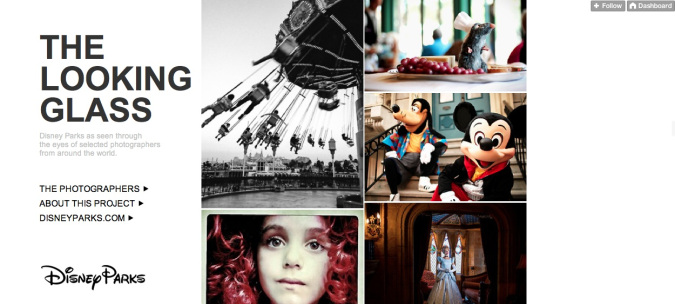
One way to employ high-arousal emotions is to tap into your customer’s inner child. For its part, Disney invited a handful of photographers to visit its theme parks and document their experiences. They weren’t given much direction beyond shooting “what they’d like to see captured,” and some of the photographers used nothing more than an iPhone or an iPad to capture their images. The results became The Looking Glass Tumblr, which I’d be willing to bet elicits fond childhood memories in just about anyone who’s ever been to a Disney Park.
3 Tips for Successful Content Marketing on Tumblr image successful content marketing tumblr disney

The General Mills Tumblr, meanwhile, showcases some amazing DIY arts and crafts projects that were created from cereal boxes (and, in some cases, the cereal itself). With the help of photo-based instructions, this successful content marketing approach served to bring out the kid in this kid-friendly brand’s followers.
 
If your brand’s personality doesn’t lend itself to whimsy, you can also try something more dramatic. For example, the Adidas Football Tumblr is divided into albums of photos that are heavy on victory-related imagery. The brand’s page even comes with its own heart-thumping audio soundtrack.
3 Tips for Successful Content Marketing on Tumblr image successful content marketing tumblr adidas

The months to come will bring changes to Tumblr advertising, but what isn’t likely to change is the vital role Tumblr can play in your brand’s successful content marketing strategy. Use it wisely, use it often, and use it well

Need help with YOUR Internet Marketing? Contact us and visit: http://www.janetpennconsulting.com/internet_marketing.html


Tuesday, June 11, 2013

The Complete Guide to Using YouTube for Your Business by Skadeedle

YouTube is not just a platform for sharing videos, but it’s also one of the most popular search engines on the web — second only to Google. And YouTube is the third most popular website in the world, with over a billion unique visitors each month according to the company. Using YouTube for your business has the potential for not only improving your search engine rankings, but also energizing your current customers, and attracting new ones.

Using YouTube allows you to provide a personal touch to your marketing in a way that’s easy to distribute. Here’s a rundown of how to:
Video Length

YouTube allows you to record videos that are up to 15 minutes in length by default. If you’d like to create longer videos, you can visit the video upload page and click on “increase your limit.” YouTube will prompt you to verify your account with your mobile phone. Make sure your browser is up-to-date so you can upload larger files.
Longer videos aren’t necessarily better, however. If you’re focusing on educational content, it may be difficult to fit all of that content into just a few minutes; however, the most viewed videos are often five minutes or fewer. So don’t be afraid to start your YouTube experience with small, snappy videos rather than waiting until you have time to create a longer one.

Types of Videos


When creating videos on YouTube, it’s important to focus specifically on the content your clients, prospective clients or fans are looking for. That means your videos should be oriented towards serving their needs. When was the last time you called up a friend and told them to tune into the Home Shopping Network? Videos that look like infomercials are less likely to be shared. Providing tips and information people can use right away for their business increases the likelihood of your content being shared – Position yourself as an expert in the industry and use YouTube as part of a long-term public relations strategy, rather than working on just one sale.
Aside from offering quick tips and tactics, YouTube is an excellent place to upload client testimonials. Written testimonials can be tricky, and it’s difficult to determine if the testimonial was actually written/stated by real people. Video, on the other hand, makes the testimonial more convincing.

YouTube videos can be used to provide an office tour, to show a behind-the-scenes look at an event, or even to provide video biographies of people in your business. You can even interview leaders in your industry, or record presentations for people who would otherwise be unable to attend.
If you’d like people to see presentations you’ve made without your face on the video, you can create screen shares using paid products like Jing, Camtasia or Screenflow, and then upload the videos onto YouTube. You can also broadcast a Google+ hangout or a live webinar (using GoToWebinar, for example) directly to YouTube.

Equipment
Using YouTube with a flip cam or even the built-in camera in your computer is a great way to start if you have a limited budget. Make sure to use bright, natural light shining across your face, and record in a quiet room. Using a pair of regular headphones can help reduce background noise.

Signing Up
To sign up for YouTube, you’ll need to sign in with an existing Gmail account. This will integrate well with Google+ and allows you to use Google hangouts. Get started at youtube.com/signup.

When selecting your username and channel name, make sure to use your business name or specific keywords in your industry. (You’ll want to include the URL for your channel in your marketing material.) Also, be sure to add a channel description and a trailer to help people understand what your channel is all about, and what to expect.
To optimize your YouTube profile, make sure to include your website URL in the beginning of your video description and “About Us” section. If you put it in the bottom of your description, less people will see it, as they’ll need to click on “more” to read the rest of the description. Also, make sure to use http:// in front of the URL, so that it becomes a clickable link. Otherwise, viewers will have to cut and paste it into their browser.
You’ll also have the opportunity to choose a specific category for your channel.

Colors and Images

In your channel setting, under appearances, you can choose a background image and color. A graphic designer can help you adapt your logo or another image central to your business, and you can also choose a color that matches your company colors.


In addition to selecting background images or colors, you can also customize your layout in the “Featured” link.
 The tabs section allows you to determine how your channel shows up to others, so make sure to take a look at the different options and select the one you prefer.

Editing

 
YouTube has a robust set of editing features to improve your video, in the “Edit video” mode. Enhancements allow you to improve video quality (via auto fix), change your video style, play with lighting, blur faces (if they’d prefer to be anonymous) and correct shakiness with the stabilize feature. You can use “annotations” to add links to videos, channels and playlists, or even to prompt viewers to subscribe to the video. In addition, you can add royalty-free music to your video. You can also splice together clips from multiple videos in the Video Editor section.

After Uploading Your Video

 
Your video title is a headline of sorts, and should be both descriptive and compelling.
You’ll want to make sure that your description—especially the first two sentences—is equally enticing and includes keywords that the people you want to view the videos will actually be searching for. Use tags (in the info and settings section) that describe the video content—both specific ones and broad overviews. Put the most important tags first. Ask yourself what keywords viewers would use?
Make sure to include links to your channel and playlists, and let people know how to subscribe.

Featured Videos

 
Once you’ve uploaded several videos, you can select a few as “featured” videos, and even prompt users to view future videos after they’ve seen certain ones. Just write what video they should view next in the description.

Sharing Your Video

 
Make sure to post your video on all of your social media channels. This will help your content get seen and shared. There’s a share button below your video that will allow you to post it on social media or send the link out in your email newsletter.
To upload the video onto your website, just click on “share file,” highlight the HTML code provided, and copy it into the HTML editor on your website. You can also change the actual dimensions of the video so they will fit on your site.
Don’t forget to remind your viewers to share your video! As you build up your subscriber base, this will happen more naturally, but until then, asking key influencers in your industry to share your video as well can be helpful.

Privacy Settings

For the most part, you’ll want to make your videos public so that anyone can view them. However, you can make a video private if you’re still editing or deciding whether or not to use it. If you would like to show a video only to people who have the link, you can create an ‘unlisted’ video.
 
In the “tabs” section of your profile, you can choose which activity you wish to share. For example, you can make your comments on other videos public or private.

Analytics and Reports

YouTube has reports you can download to measure how your content is performing. Clicking on “analytics” next to the Video Manager tab in your channel’s homepage will allow you to see specific stats and information on your viewers.


It also allows you to see the top 10 watched videos, as well as demographics and playback locations.
You can also see statistics below each video by clicking on the “statistics” link. This allows you to see the age and gender of audience members, where the views are coming from, and more.
Using these analytics, along with other metrics (such as social media shares, direct responses from your email newsletter, number of people who visited your website directly from specific YouTube videos, new subscribers to your YouTube channel, and so forth) will help you create even better videos over time, and can be an integral part of a dynamic marketing strategy.

With just a small investment of time and tools you can create fun and engaging videos to host on your own YouTube channel. Sharing your videos on social media, your website and in emails can help bring new customers to your business, and keep the current ones as your biggest fans, so give it a try it today!
Need help with Optimizing YOUR videos? Contact us and visit: http://www.janetpennconsulting.com/video-optimization.html


How to Add Video to Your Email Newsletter by Chris Robley

How to Embed Video in EmailHave you ever wondered how to add
video to your emails?

Of course you have. Video is one the best tools for driving online engagement. Everyone loves ‘em: big, bright, flashy videos!

Well, here’s the thing — most people’s email programs don’t display videos. They disable them or strip them out entirely.

But here’s a clever and easy workaround for you to try.

Add a video image to your email that links directly to YouTube

1. Go to YouTube and take a screenshot of your video as it appears inside the YouTube player.

2. Copy the URL for your video on YouTube.

3. Embed that image (screenshot) in your HTML email.

4. Link the image to the YouTube URL.

Bam! Now when someone clicks the picture in the email, they’ll be linked to your YouTube channel where the video will start playing automatically.

Also, remember that not everyone on your mailing list will have images enabled in their email programs — but you can include ALT text with the image (something like “click here to watch my new video!“) so the recipient will know what to do if there is no image displaying in the email.

Create stunning HTML emails with ListBaby, free with any HostBaby membership.
 
courtesy of http://blog.hostbaby.com

Need help with Optimizing YOUR videos? Contact us and visit: http://www.janetpennconsulting.com/video-optimization.html

Need help with your email marketing efforts? Contact us and visit: http://www.janetpennconsulting.com/email_marketing.html

Is Wikipedia's front page for sale? by Tim Sampson

As the sixth-most visited website globally, Wikipedia is a hot piece of digital real estate. The online encyclopedia is currently struggling to address the rise of publicists and marketing agents who turn a profit by generating articles on behalf of their clients.

"The fact is that Wikipedia's main page's multi-millions of pageviews per year are being turned into a commodity by the PR industry," writes Wikipedia Editor Tim Davenport, who goes by the username Carrite. "That must stop."

Davenport was referring to this website for Tony Ahn & Co., a marketing firm based out of the Philippines that offers to provide Wikipedia pages for its clients. The company boasts a flawless record of nominating pages to the highly sought after "Did You Know?" section of Wikipedia's main page.

The company launched a little over a year ago to fill, what its founder described as, "a dearth of people that could craft high quality articles that met Wikipedia's standards for inclusion." For a fee, the company will create a 600 to 800 word entry with citations, references, and two client provided photos.

Profiting from the production of Wikipedia content has been a notoriously touchy subject for Wikipedians in the past. Last year, a board member of Wikimedia U.K. (an independent, nonprofit organization that fosters the growth of Wikipedia projects in the United Kingdom) was forced out over a conflict of interest involving his work as a publicist for the British overseas territory of Gibraltar.

But Ahn told the Daily Dot that his firm remains reverent of Wikipedia's rules.

"We're very careful to respect Wikipedia's processes for both article creation and DYK nominations," Ahn said. “We neither charge extra for a main page placement, nor do we advertise it as something we can do for clients.”

It's a narrow path to walk for Ahn and his firm. To avoid Wikipedia's conflict of interest rules, he's not even directly allowed to post articles that he or his employees have written for profit. Instead the articles for Ahn's clients are written in a Wikipedia sandbox, then presented to Wikipedians for review. These unpaid editors act as the gatekeepers who decide if an article is up to snuff.

As far as main page appearances in the DYK section, Ahn is quick to point out that none of his clients can pay to have their article placed there. However, he said his firm has a perfect record of nominating pages for DYK appearances that are then independently chosen by other Wikipedians who deem the content worthy.

Ahn sees this kind of semi-sponsored content as essential for celebrities, public figures, and businesses looking to manage their online reputation.

"If you search for Coca Cola, for example, you notice that the Wikipedia entry for Coca Cola is the first website that is not Coca Cola-owned that appears. This is important from an online reputation management standpoint, as ideally one wants every entry on the first page of search results to be about one's brand. Wikipedia occupying a high slot on page one of search results keeps something else off page."

Although Ahn's tactics are—to most—technically within the rules, his business-savvy approach to producing Wikipedia content has ruffled the feathers of many who say his company is violating the spirit of Wikipedia law.

In the discussion of these practices, Wikipedia cofounder Jimmy Wales had sharp criticism for anyone trying to manipulate Wikipedia for profit, singling out Ahn and calling his actions a "disgrace." Wales has reportedly demanded that Ahn not seek a place on the Wikimedia Philippines board—a suggestion that Ahn has not taken.

"I think you're incredibly blase about the reputation of the project," Wales said to another editor trying to defend Ahn's tactics. "This is completely and entirely unconvincing to me, and would be so to the general public—with good reason. This whole approach to Wikipedia is revolting."

Not everyone is in agreement with Wales. Ahn has many supporters, who've defended him on Wikipedia forums, claiming "he's always been open about all of his affiliations."

Some tried to move the debate away from Ahn's actions specifically, instead raising the questions of whether Wikipedia can remain completely devoid of sponsored material or if it even needs to in order to maintain its reputation.

"Wikipedia is non-commercial, true, but that doesn't mean to say that commercial interests shouldn't contribute to Wikipedia as long as content requirements are met," wrote Wikipedian Prioryman.


Monday, June 3, 2013

Mari Smith on How Small Businesses Can Use Facebook by Brent Leary

Did you know that your Facebook updates are never going to be seen by 100% of your fans in your newsfeed? Instead, only 2% to 48% will see them. Yet, Mari Smith, who has been called the Queen of Facebook, still says Facebook has value for small businesses. She offers several highly specific tips in this interview about Facebook for small businesses.

Small Business Trends: Can you tell us a bit about your background and how you got to be what a lot of people call the ‘Queen of Facebook?’
Mari Smith: Throughout my entire career, I’ve had a deep passion for people and technology. Since 1999, I’ve been deeply immersed in the world of eCommerce, Internet marketing. I was an online marketing consultant for a long number of years. Then, in 2007, Facebook just fell into my lap. I was chosen to be on the data team of an app. It was really a defining moment in my life. I just fell in love with Facebook. Within weeks I became an evangelist.

Small Business Trends: When did you know Facebook was going to be important for small businesses?
Mari Smith: From a small business marketing standpoint, to me, it’s all about relationships. One of my blogs is called The New Relationship Marketing. Relationship marketing is about fostering those relationships which you can start through social media, through Facebook, through Twitter, and then ultimately – you might meet people in person.

It’s really a matter of strategically thinking through what content you are posting through your personal profile and your public fan page in a manner that people are – top of mind. They may think, ‘Gosh, I really need to go and buy a new dress or a wedding cake or whatever different people do.’ You are top of their mind because they have built this relationship with you and you’re in their news feed, sharing valuable content and sparking interest with little personal goodies.
Small Business Trends: Can you rate, on a scale of one to ten, how successful small businesses have been when it comes to leveraging the power of Facebook to help grow their business?

Mari Smith: I would say the vast majority of small businesses are probably somewhere around a three or a four on that scale, unfortunately. I think the main reason is that Facebook is in a ‘pay to play’ mode. They have to make money; that’s just the way it is. It’s just the algorithm that’s at play. You might buy ads in order to build a fan base, which is a terrific use of your advertising dollars, but then people are like, ‘Well, we’re only going to display and post to a percentage of fans.’ Your posts are never going to be seen by 100% of your fans in your newsfeed. It could be anywhere from 2% to 48%. I think at one time years ago, it was at 16%.
One thing to keep in mind as a small business owner is that just because you have 1,000 fans, all 1,000 of those people are not seeing your posts. It could be a fraction of those. You have promoted posts and there are sponsored posts. There are just a lot of complex features in there that you can buy. But unless you know what you’re doing, you might be wasting your money. You might not be getting a good ROI – return on investment.

I think where people struggle is that there’s these complex features and there’s a lot of change. Facebook is always changing their features. If we can back up a second and take complexity out of the picture and look at the fundamentals of small business success, you see that a lot of it comes with not really knowing, ‘Why am I on Facebook in the first place?’ What am I trying to do here? Am I trying to just generate fans and get better sentiment for my brand or actually sell product or improve customer service or just get visibility?’
I would recommend that most small businesses approach Facebook marketing from the standpoint of generating email leads and gently guiding people to cross into your funnel, your e-mail list, your blog, your website and looking into your offers.

Small Business Trends: What percentage of small businesses are actually able to do direct commerce on Facebook? Is that even in the equation for most businesses?

Mari Smith: It is. In fact, there’s a whole factor of online commerce, called Facebook Commerce. There are new sites and there are services and platforms that are popping up all the time. I just came across a new one recently called Bionic and they have an app that you can add an IQ Offer. You can put up an offer that’s maybe 50% off for the next 24 hours. Then you can drive people there through an ad, for example. People can click on that and purchase right away through PayPal. So, for the small business owner, that’s a way to instantly monetize an offer.
Facebook actually has an offers feature. You click the button and you claim it. Just because somebody’s claimed it doesn’t mean that money has actually passed hands, not yet.

Commerce is still in its infancy. I think we’ve got another couple of years yet where people are really starting to feel more comfortable getting their credit card out. With PayPal, there’s a trust already existing there, which is great. Someone getting their credit card out and saying, ‘I feel happy to buy this right off of Facebook’ is in it’s early days yet.
Small Business Trends: Do you feel that small businesses are leveraging Facebook with the right expectations?

Mari Smith: A lot of people that I talk to, a lot of small business owners, come to Facebook as the Holy Grail. They think that they’ve got over a billion members and there are stories of people making millions of dollars through Facebook marketing. Many of them are spending money to make that money with ads, which is quite frankly the most incredible targeted demographics that your money can buy; far better than any other advertising product and I don’t have any agenda saying that. It’s just a fact.
One thing that small business owners could do with Facebook is build up their email list. Put up your email list with 1,000 people, and they’re from other sources, not necessarily through Facebook. You can take that database and upload it to Facebook using what’s called the Power Editor. Upload their own data base and Facebook is going to go and search their site and match profiles with your database. Maybe only half of them will match and that’s okay.

Now you have this set of almost 500 people and you can find out lots more information. You can actually segment your database and get a ton of information as a result of matching them. You can place ads. You can advertise to people on your own database. It’s called Custom Audience. Then you can do something that’s called Look Alike Audience, which means that Facebook will then gather up an audience of people that you can advertise to that would have never known about you, are not on your list, are not your fan, but they look similar to your current database. That’s cool, right?
Small Business Trends: If you were a small business going on Facebook to build a list, what kind of content may work best when you’re trying to do it from that perspective?

Mari Smith: I have this rule, basically 80/20. So, talk to the fans with no agenda value, the 80%. When I say no agenda value, that means OPC – other people’s content. You’re sharing a mix of your content, articles, resources, tools and then 20% of the time, you’re going to ask for the sale. You’re going to ask for the lead.
One of my favorite ways is through a webinar. I gather my fans and drag them over to an option page, where I capture the email address and that’s where I’m going to periodically do that, I don’t do that all the time. I do it maybe once a quarter. I’ll do an initiative, where I’m gathering up, where I’m doing an offer. So, that’s just something to keep in mind is that you don’t have to be asking for the sale all the time. But you have to have it strategically mapped out in your marketing calendar for the year, as to when you are going to do offers and promotions and do them in spurts.

That will add tons of value on a regular basis; ideally once a day. Even if it’s just one post a day or maybe two posts a day on Facebook; on your fan page. That would be plenty; that would be sufficient.
 
Contact us and visit: http://www.janetpennconsulting.com/social_mediamarketing.html

5 Pillars of Successful Mobile Design by Grace Smith

Designing for mobile has evolved dramatically. Users now expect fast, immersive mobile experiences, and catering to this is increasingly difficult.

When Luke Wroblewski introduced the concept of Mobile First more than four years ago, it radically changed how we approach design. According to him, the reason was threefold:
It was clear mobile use was going to take over; designing for mobile pushed you to better and simpler designs because of constraints like small screens and slow networks; and last but not least, mobile devices had capabilities like multi-touch and location detection that allowed you to create new kinds of experiences.

Wroblewski is founder of Mobile First, a former Yahoo VP, co-founder of BagCheck (which was later acquired by Twitter). He recently launched Polar, which lets users quickly set up polls to get feedback on timely issues.
We asked Wroblewski for five powerful app design tips, ranging from speed and signup processes to enforced constraints and the importance of taps.

1. Perception is not reality.
People now expect a lighting-fast user experience each time they use a mobile application. However, Wroblewski concedes the situation is actually "more dire than that, as people expect a faster experience on mobile than on the desktop, but the networks are slower." So, you're fighting performance on both sides, he says. While you can help speed things up by minimizing assets and improving response times, for example, you can only go so far. "Eventually you’ll bump into the realities of mobile networks."

Wroblewski notes techniques that improve perceived performance, giving the "sense that the app is reacting to your input, despite the fact that nothing has actually happened yet."

Instagram co-founder Mike Krieger calls this technique "performing options optimistically," meaning you can create the illusion that your action has taken effect, when in reality, it hasn't yet.
Wroblewski uses an example: When you like a photo on Instagram, the button instantly informs you that your action is complete. In reality, a network connection is in the process of telling a server what you did. "But Instagram’s user interface doesn’t wait for the server to verify this actually happened. They optimistically assume it happened," he says. "If something goes wrong later, they deal with it then rather than incurring a delay up front. Commenting works the same way."

The same principle applies to acknowledging touch gestures with subtle UI changes. Immediately when you tap or swipe, your app responds. "Techniques like this increase the perception of performance and, alongside actual performance improvements, they can go a way toward creating fast mobile experiences," says Wroblewski.

2. Postpone signup to improve engagement.
Creating an interface and user experience that will get people to actually engage with your mobile app (and most importantly, keep using it) is a challenge all app developers face. The statistics Wroblewski states are sobering: The average iOS and Android user only downloads three to five apps per month. Of those, 26% are only opened once and never used again, and another 48% are opened 10 times or less.

According to Wroblewski, you have two options. Get the most out of every user when he first downloads and opens your app: Ask for his email address, grab his address book, connect him to Facebook, and so on — with the intent of providing a better experience that keeps him coming back. However, this approach tends to frustrate people, enough that they either skip it or, worse yet, abandon the app. Usually, less than half of people who download an app actually complete the signup process.
Your other option is to postpone signup and let people actually jump in and start using your service. In this model, defer all your asks until they’re more appropriate. This approach can foster action. Wroblewski is an advocate of this approach: "letting people get going instantly, then bringing things to them." He incorporated it into Polar, which "targets people when they are actually engaged with our product ... The 'everything at once' before you ever use the app can be effective for some, but it can also turn others away."

3. The mobile canvas comes first.
Presenting large amounts of information on the limited real estate of a mobile screen is difficult. Wroblewski admits, "Complex interfaces with lots of information were designed for a specific medium — where you can fit lots of things on a big screen, using the precise input of a mouse cursor or keyboard."

But Wroblewski observes people who often don't actually take the time to try to make their app work for mobile. "Many times that’s all it takes." He points to an example, Jason Grigsby at Cloud Four, who designed an expense-report application using responsive web design. After staring at the desktop version of the app for a while, Jason couldn't fashion a workable approach. Instead, he moved on to designing a mobile version. "As he did, everything snapped in place. Not only could he see how the app could become responsive, but he found a number of ways to make the full screen experience better."
"There is power in starting from the mobile canvas, instead of from your existing interface," says Wroblewski. "When you instead start with a different medium, defined by small screens and much coarser inputs like touch, you end up with a different design."

While there are other more-detailed interface design techniques, such as responsive tables and off-canvas elements, Wroblewski is keen to emphasize, "Those are implementation techniques that will only help you when you’ve got the big-picture approach in place."

4. Enforce constraints.
One of the biggest challenges in mobile design is "unshackling yourself from 20+ years of desktop computing and the web."

One of the biggest challenges in mobile design is "unshackling yourself from 20+ years of desktop computing and the web." Both create a lot of unconscious baggage, says Wroblewski. "That is, you are drawn toward familiar solutions, patterns common to the PC era of software."

While mobile has many similar capabilities to the PC, it has limitations, too. "Many of your instincts will be wrong," says Wroblewski. "I’ve been designing web apps since 1996, so I have a lot of 'best practices' to unwind, and I often learn the hard way that I’m making things too complex for mobile."
Wroblewski uses creative constraints that force him "to deal with the reality of mobile use." For instance, he makes sure someone can do things with just one thumb, ensuring a certain task can be completed in seconds, not minutes. "When these constraints are grounded in how people actually use their mobiles, you’ve given yourself a great way to tell if you’re going in the right direction with your design."

5. Respect the importance of taps.
Every swipe, tap and action a user takes is important and has a lasting impact on user experience. "When people feel like they are making progress towards something they care about, they’ll be more tolerant of an extra tap or swipe," says Wroblewski. "But for the most part, if you increase effort, you tend to decrease participation."

The CEO of Hotel Tonight illustrated that booking a hotel on his app requires only three taps and a swipe, totaling about eight seconds. He compared it to Priceline’s mobile process (52 taps, 102 seconds) and Hotels.com’s app (40 taps, 109 seconds).
The inverse is also true — moving actions a "tap away" can have negative consequences. Wroblewski cites the Microsoft mobile Internet Explorer team, which, in an effort to simplify their UI, moved the buttons for browser tabs and favorites under a "more" menu. After all, what’s one more tap? Turned out it was a lot. Restoring one-tap access to tabs and favorites was overwhelmingly the No. 1 feature request of mobile IE; it actually made the top 20 list across all of the Windows Phones.

While recent years have seen an explosive growth in the mobile app industry, Wroblewski feels there is still a lot to be learned, which is why mobile remains so exciting. We're still in a period of enormous growth as more of the world comes online, increasingly through a mobile device. It's taken some time to start shedding our PC tendencies, but more uniquely mobile designs emerge every day.
courtesy of http://mashable.com

 
Contact us and visit:
http://www.janetpennconsulting.com/mobile_tablet_websites.html

Tuesday, May 28, 2013

5 Reasons You Can No Longer Afford to Ignore Google Plus by Amie Marse

Despite all the hoopla that surrounded the new social site when it was first released, many businesses are ignoring Google Plus completely in exchange for increased focus on sites like Facebook and Twitter. While 72 of the world’s largest 100 brands have a Google Plus page, nearly 40 percent of them haven’t posted any content on the site. But when you consider that Google Plus is the brainchild of the world’s most powerful search engine, is it really the brightest strategy to ignore Google Plus for business?

Even though it might not be a major traffic driver like Pinterest or other social sites, Google Plus has some incredible benefits.

The Benefits of Google Plus for Business

Momentum

The Business Insider recently reported that growth for Google Plus has suddenly spiked. In fact, the boom is so noticeable that Google Plus is on track to overtake Twitter as the world’s 2nd largest social media site, assuming that the momentum doesn’t slow.

Up 33 percent with 359 million users, more people visit Google Plus on a regular basis than live in the United States. If there’s anything that marketing’s taught us, it’s that you always want to be ahead of the curve – and right now the curve is favoring Google Plus for business.

Growth

Aside from increased traffic, Mashable reports that Google Plus is also seeing an increase of time spent on the site. Users are now spending twice as much time on Google Plus than they did in February and the trend doesn’t appear to be slowing anytime soon.

As more and more people spend time on the site, the more powerful traffic driver this platform will become.

Authorship

Having a Google Plus account allows you to claim authorship of your original content. This keeps your unique and original content valuable and accredited to you, even if content thieves scrape your work.

Furthermore, the implementation of Google Plus means that links and referrals will be weighted based on who they come from instead of where they’re posted. Authorship gives you credibility and power.

Search Engine Recognition

It goes without saying that a strong Google Plus presence directly correlates to stronger search engine recognition. While it can’t replace solid SEO strategy, why not enhance your efforts?

Flexibility

Whether you want to host Google Hangouts or filter posts for your Circles, Google Plus provides flexibility options that many of the other platforms don’t. By taking advantage of these features, you’re making your brand’s online presence unique from everyone else’s.

To make your Google Plus page even more effective, be sure to incorporate profile links. Unlike other social platforms, you can link to other sites throughout your Google Plus profile, thereby strengthening your overall sales funnel. As more people engage with you by sharing and giving you posts a +1, your profile links will suddenly become powerful tools.

Be sure to optimize your Google Plus title tags for search engine results. Having a highly optimized Google Plus page is much easier to rank than a standalone website. Add a picture to your profile and an author picture for content that you will claim through “Authorship.”

Posts with pictures are clicked on up to 5 percent more than posts without. Once you’ve optimized your Google Plus presence, you can enjoy Google’s bias in quickly indexing posts that have received a+1.
 
courtesy of: http://smallbiztrends.com Amie Marse

Contact us and visit: http://www.janetpennconsulting.com/social_mediamarketing.html